tvOS 27: what's new on Apple TV 4K
Apple's tvOS 27 redesigns the Podcasts app, upgrades the Music app and lets you make text bigger across apps.

tvOS 27 brings three main changes to Apple TV 4K, according to Apple's user guide. The Podcasts app is redesigned with video podcasts and a sidebar. The Music app gets the same sidebar, seamless song transitions and high-res lossless audio up to 24-bit/192 kHz. You can also change text size across apps that support Dynamic Type. Update from Settings, then System, then Software Updates.
A redesigned Podcasts app with video
Apple says the Podcasts app is completely redesigned. It now supports video podcasts, and it uses the same sidebar as the Apple TV app for navigation. You can browse recommendations and collections from Apple Podcasts editors, follow shows, save episodes to your library, and pick up where you left off on another device. Some podcasts require a subscription, priced by the creator.
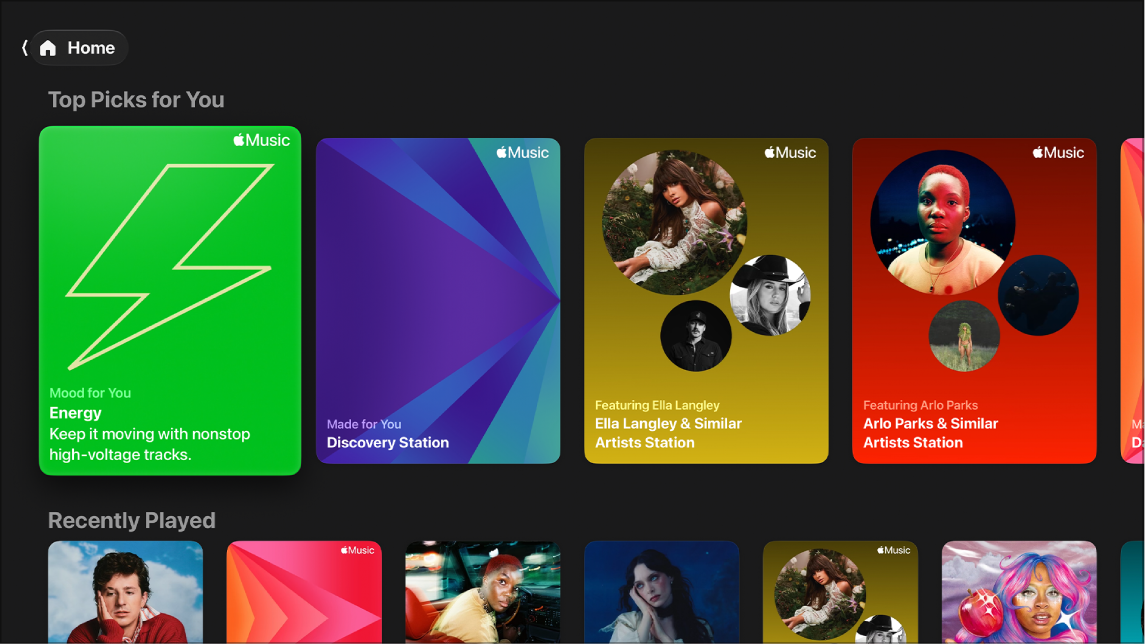
Music app: sidebar, transitions and high-res lossless
The Music app adds the sidebar, plus seamless song transitions, which Apple describes as letting you play music like a DJ. It also supports high-res lossless audio up to 24-bit/192 kHz. Apple notes that lossless playback depends on song availability, network conditions and speaker capability, so most TV speakers and soundbars won't reproduce the full resolution.
Other Music features carry over: Spatial Audio with compatible AirPods, Beats or Dolby Atmos speakers and receivers; real-time lyrics with an iPhone as a microphone; SharePlay; ad-free music videos and Apple Music TV; and radio. Full access needs an Apple Music subscription.
Bigger text across apps
You can now adjust text size across all apps that support Dynamic Type. Go to Settings, then Accessibility, then Display, and change Text Size or turn on Bold Text. It's a simple fix if menus are hard to read from the couch. Our Apple TV menu guide covers the other display and remote settings.
Using the new Podcasts app
- Find shows: open the sidebar and browse recommendations based on what you follow, or collections picked by Apple Podcasts editors.
- Watch or listen: video podcasts play full screen like any show; audio podcasts show artwork and playback controls.
- Save for later: add episodes to your library and find them in the sidebar.
- Switch devices: listening syncs across your Apple devices, so you can start on the TV and finish on your iPhone.
- Subscriptions: some shows charge for extra episodes or no ads. Prices are set by the creator.
Music app tips on Apple TV
- Sing along: turn on real-time lyrics, and use your iPhone as a microphone to hear your voice through the TV. On Apple TV 4K (3rd generation) with Continuity Camera, you can sing on screen with video effects.
- Play with friends: SharePlay lets friends on other Apple devices add songs to the queue.
- Music videos and radio: Apple Music TV is a free 24-hour music video livestream. Curated and broadcast radio stations are also in the app.
- Your library: includes Apple Music, iTunes Store purchases and songs synced from other devices. Pin favorites to reach them faster.
- One device at a time: an individual Apple Music plan plays on one device at a time; the Family plan allows several.
Play music from your Mac, iPhone or iPad
You can also stream music that's on your Mac, iPhone or iPad to Apple TV 4K with Home Sharing, according to Apple. For whole-home audio, Apple TV 4K can play through HomePod or AirPlay speakers, and connect to AirPods or Beats for private listening.
How to update to tvOS 27
Apple notes that not every feature is available in every country or on every Apple TV model. Check Apple's support site to confirm your model gets tvOS 27.
- Open Settings on the Apple TV.
- Go to System, then Software Updates.
- Select Update Software and install the update. The Apple TV restarts when it finishes.
- To install future updates on their own, turn on Automatically Update on the same screen.
What you need for the best sound
To hear high-res lossless at full quality, you need a sound system that supports it; Spatial Audio needs AirPods, Beats or Dolby Atmos speakers or a receiver. A fast, steady connection also matters for lossless streaming. If your Wi-Fi drops out near the TV, see our streaming device guide for setup tips, or run a speed test.
Should you upgrade your Apple TV?
tvOS 27 runs on Apple TV 4K models. If you have an older model and want the newest features, our Apple TV 4K review covers the latest hardware.
Questions
Is tvOS 27 free?
Yes. tvOS updates are free from Settings, System, Software Updates.
Does tvOS 27 add video podcasts?
Yes. The redesigned Podcasts app supports video podcasts.
What is high-res lossless?
Audio up to 24-bit/192 kHz with no detail lost to compression. It needs compatible speakers and a strong connection.
Do I need Apple Music for the Music app?
Full access to songs and features needs an Apple Music subscription. Apple Music TV is free.
Can I watch video podcasts on Apple TV?
Yes. The redesigned Podcasts app in tvOS 27 supports video podcasts.
- Apple Support, Apple TV 4K User Guide (tvOS 27), checked Oct 29, 2026. Illustrations and screenshots courtesy of Apple.
Jean founded ShopHighSpeed after trying to find one straight answer about business internet in his own town. He has been a Comcast and Verizon Fios customer, and ranks providers on what they actually deliver, not on what they advertise.