Asus ZenWiFi BT8 review: Wi-Fi 7 mesh without the subscription
What the BT8 does well, where its 2.5 Gbps ports limit it, and how it compares with eero.

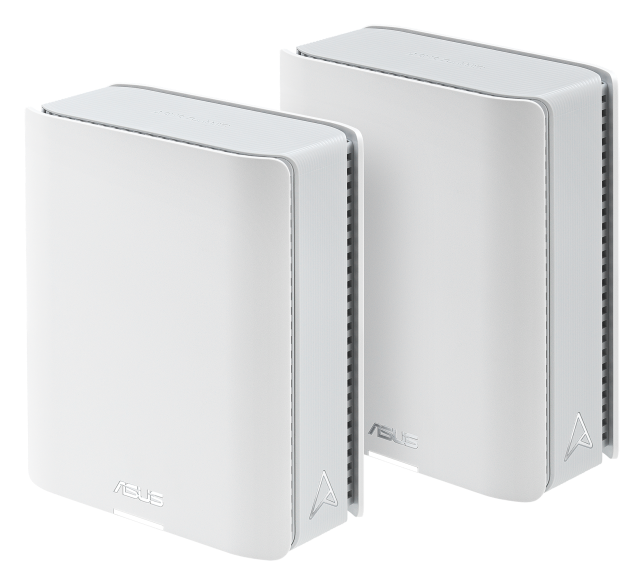
The BT8 is one of the best-value Wi-Fi 7 mesh systems for plans up to about 2 Gig. It covers large homes, includes security and parental controls with no subscription, and often sells well below its $899 list price. Skip it if your plan is faster than 2.5 Gbps. Watch for Black Friday mesh deals.
Some links are affiliate links. Our picks are based on specs, maker documentation and published lab tests, noted where used.
Prices checked Oct 18, 2026. The BT8 sells well below list price most of the year; the figures below are recent Amazon and Consumer Reports listings.
Verdict
- Tri-band Wi-Fi 7 for far less than flagship systems
- Security and parental controls included, no subscription
- Deep settings in the AsusWRT app and web interface
- Wired or wireless backhaul
- Works with other Asus AiMesh routers
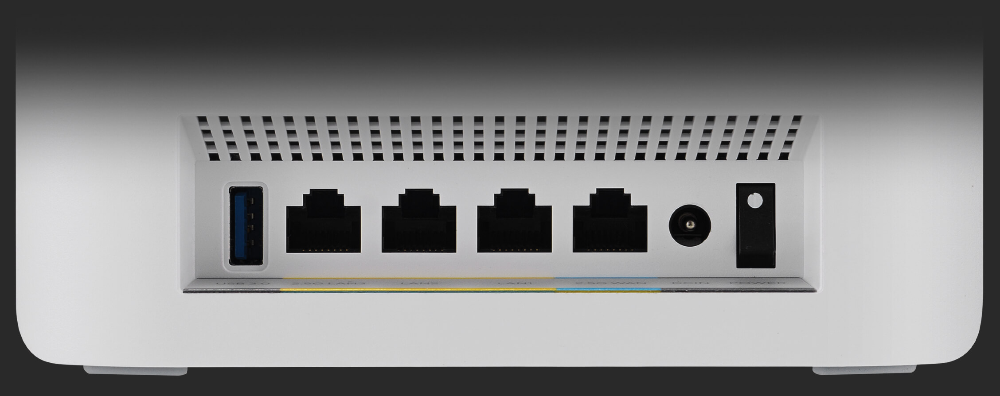
- Ports top out at 2.5 Gbps, so no 10 Gig plans
- Only two 2.5 Gbps ports per unit; the rest are 1 Gbps
- More settings means more to learn than eero
- Amazon customer ratings are mixed (about 3.6 stars on one listing)
Specs
Performance
Tom's Hardware measured more than 2,000 Mbps on 6 GHz at six feet, behind Asus's pricier BT10 but ahead of most systems at this price. Reviewers at GadgetGuy and Can Buy or Not reported stable connections and 600 to 700 Mbps in a far bedroom. That is more than enough for plans up to 1 Gig and usable on 2 Gig plans, where wired devices on the 2.5 Gbps port will see the full speed.
Price and value
Asus lists the three-pack at $899, and Amazon has sold it between about $567 and $730. Consumer Reports found the two-pack at $575.99 at Amazon in August. Compared with the eero Max 7, which costs $599.99 for a single unit, the BT8 covers more area for less money and does not charge for security features. You give up 10 Gbps ports and eero's simpler app.
Watch for the three-pack on sale. Amazon has sold it for about $567, close to the two-pack's usual price, and the third unit helps most in two-story homes.
Who should buy it
- Buy it if you have a 500 Mbps to 2 Gig plan, a medium or large home, and want parental controls without a monthly fee.
- Skip it if your plan is faster than 2.5 Gbps (get a system with 10 Gbps ports) or if you want the simplest possible app (see eero in the best mesh Wi-Fi systems).
- Smaller home? A single good router may be enough; see the best Wi-Fi routers.
Setup tips
Plug the main unit into your modem, or into your provider's gateway with bridge mode on, then add the second unit halfway to the far rooms. Use the 2.5 Gbps WAN port for the modem connection. Our mesh setup guide has the steps, and if you still rent a modem, buying your own usually pays for itself within a year.
If you can run Ethernet between rooms, connect the units through their 2.5 Gbps ports. Wired backhaul keeps the far unit's speed close to the main one's.
How we reviewed it
This review is based on Asus's specifications and hands-on testing published by Tom's Hardware, Dong Knows Tech, GadgetGuy and Can Buy or Not, plus price history from Amazon and Consumer Reports. More on our process is in how we research.
Alternatives to consider
- eero Pro 7: Tri-band Wi-Fi 7 with two 5 Gbps ports and the simplest app; parental controls need eero Plus. See the best mesh Wi-Fi systems.
- TP-Link Deco BE63: Tri-band Wi-Fi 7 with 2.5 Gbps ports and strong coverage for large homes.
- Asus ZenWiFi BT10: The step-up model with 10 Gbps ports, for plans faster than 2.5 Gig. Tom's Hardware lists it at $1,299 for three units.
- eero Max 7: eero's flagship with two 10 Gbps ports per unit, at a much higher price. Read our eero Max 7 review.
- TP-Link Deco XE75: A Wi-Fi 6E system that costs less and handles most plans up to about 1 Gig.
Questions
Is the Asus ZenWiFi BT8 worth it?
Yes, if your plan is 2 Gig or slower and you want Wi-Fi 7 mesh without a subscription. It includes security and parental controls for free. If you have a plan faster than 2.5 Gbps, look at a system with 10 Gbps ports.
How much area does the BT8 cover?
Asus rates one unit at about 3,000 sq ft, a two-pack at about 5,900 sq ft and a three-pack at up to 8,850 sq ft. Walls and floors reduce that.
Does the BT8 need a subscription?
No. AiProtection Pro security (powered by Trend Micro) and parental controls are included for the life of the product.
Can I use wired backhaul with the BT8?
Yes. Connect units with Ethernet using the 2.5 Gbps ports for the most consistent speed, or let them connect wirelessly using Wi-Fi 7 multi-link operation.
- Asus ZenWiFi BT8 product page, checked Oct 18, 2026
- Tom's Hardware, "Asus ZenWiFi BT8 Wi-Fi 7 mesh router review"; Dong Knows Tech, "ASUS ZenWiFi BT8 Review"
- Consumer Reports, Asus ZenWiFi BT8 (2-PK) listing, Aug 2026; GadgetGuy and Can Buy or Not reviews; Slickdeals price history
Prices and offers change often; confirm at your address before you order. How we research
Jean founded ShopHighSpeed after trying to find one straight answer about business internet in his own town. He has been a Comcast and Verizon Fios customer, and ranks providers on what they actually deliver, not on what they advertise.