Which Xfinity gateway do I have? Every model compared
How to spot your Xfinity gateway, what each model from the XB10 down to the old XB2 can handle, and how to get a newer one.

Check the label on the bottom of the gateway, or the Devices page in the Xfinity app or your account. The model number tells you which gateway you have. The newest is the XB10 (WiFi 7, DOCSIS 4.0). The XB9, XB8 and XB7 are still current. If you have an XB6, XB3 or older, it can hold back faster plans, and Xfinity will swap a rented one at no charge when you install it yourself.
Last verified: Nov. 13, 2026, against Xfinity's support pages.
How to find your gateway model
- Look at the bottom panel. The label shows the model number, such as CGM4981COM or TG3482G.
- Or check your account. Open the Devices page on xfinity.com, or the Xfinity app.
- Match the model number to the table below. Xfinity uses short names like XB8 for each model.
Xfinity gateway models compared
| Model | Model numbers | WiFi | Top speed | Ethernet | Phone ports |
|---|---|---|---|---|---|
| XB10 | SG417DBCT, CGM601TCOM, CGM601TCM | WiFi 7, tri-band | 10 Gbps | 4 | 1 |
| XB9 | CWA438TCOM | WiFi 7, tri-band | Up to 2 Gbps down, 300 Mbps up | 3 (one 5 Gbps, two 1 Gbps) | None |
| XB8 | CGM4981COM | WiFi 6E, tri-band | 2.5 Gbps | 4 | 2 |
| XB7 | CGM4331COM, TG4482A | WiFi 6, dual-band | 2.5 Gbps | 4 | 2 |
| XB6 | TG3482G, CGM4140COM | WiFi 5, dual-band | 1 Gbps | 2 | 2 |
| XB3 | DPC3939, DPC3941T, TC8717, TG1682G | WiFi 5, dual-band | 600 Mbps (275 Mbps on the DPC3939) | 4 | 2 |
| XB2 and older | TG852G, TG862G, TC8706C, TC8305C | WiFi 5, dual-band | 150 Mbps | 4 | 2 |
| MXB1 (wall-mounted) | CGM4981COM2 | WiFi 6E, tri-band | 2.5 Gbps | 2 | 1 |
| XER10 (fiber buildings) | SCER11BEL | WiFi 7, tri-band | 10 Gbps | 5 (two 10 Gb, three 1 Gb) | 1 |
| XF3 (fiber buildings) | Arris X5001 | WiFi 5 | 1 Gbps | 4 | 2 |
From Xfinity's "Overview of Xfinity WiFi Gateways and Routers," checked Nov. 13, 2026. Top speed is the gateway's maximum data throughput, not your plan's speed.
What each gateway looks like
These are Xfinity's own product images. The older black XB2 and XB3 towers aren't shown; check the label if yours is black.

Image: Xfinity
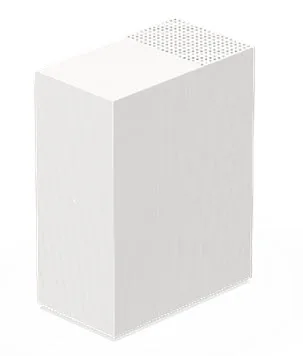
Image: Xfinity
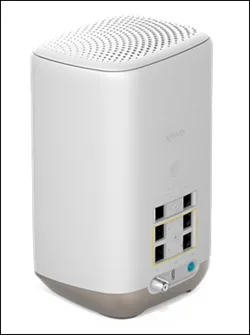
Image: Xfinity
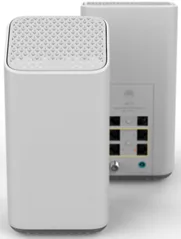
Image: Xfinity
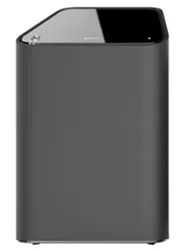
Image: Xfinity
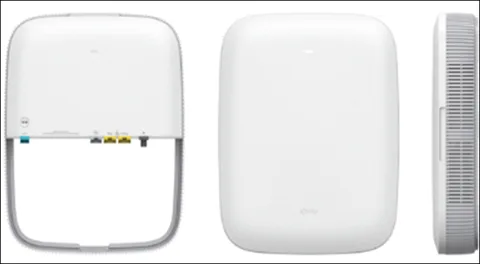
Image: Xfinity
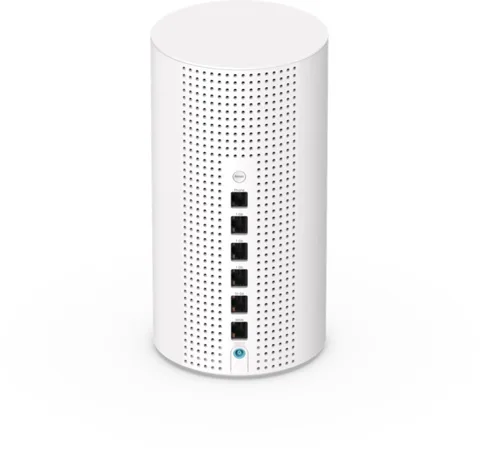
Image: Xfinity
What to know about each model
XB10: the newest
Xfinity calls the XB10 its first device to combine DOCSIS 4.0 with WiFi 7. It has four Ethernet ports, up to 10 Gbps of throughput, and tri-band WiFi on 2.4, 5 and 6 GHz. It has one phone port, and battery backup for Xfinity Voice isn't available on it.
XB9: WiFi 7 without a phone port
The XB9 brings WiFi 7 and 6 GHz to Xfinity's DOCSIS 3.1 areas, with up to 2 Gbps down and 300 Mbps up. Two catches, both from Xfinity: it has no phone port, so it can't be used with Xfinity Voice (those customers should get an XB8 or XB10), and it doesn't work with Xfinity TV if all your TV boxes are older XiD or Xi3 models. If either applies, Xfinity says to contact it or visit a store to swap.
XB8: WiFi 6E with battery backup
The XB8 has WiFi 6E, tri-band WiFi, four Ethernet ports and up to 2.5 Gbps of throughput. It has two phone ports, and battery backup is available for Xfinity Voice.
XB7: still capable for most plans
The XB7 has WiFi 6, dual-band WiFi, four Ethernet ports and up to 2.5 Gbps of throughput, with battery backup available. Xfinity says gateways from the XB7 up are the only ones with a backup battery you can still buy (outside fiber-to-the-unit buildings).
XB6: time to think about an upgrade
The XB6 tops out at 1 Gbps and has WiFi 5 and only two Ethernet ports. Its backup batteries are no longer sold. If you pay for a gig plan or have lots of devices, a newer gateway helps.
XB3 and XB2: too slow for today's plans
The XB3 tops out at 600 Mbps (275 Mbps on the DPC3939), and Xfinity calls the XB2 and earlier "old wireless gateways with limited speeds," topping out at 150 Mbps. If you rent one of these and pay for a faster plan, you're not getting your speed over the gateway. Ask for a replacement.
MXB1, XER10 and XF3: apartment buildings
The MXB1 is a flat, wall-mountable version of the XB8 for Xfinity's Connected Building properties. The XER10 (WiFi 7, two 10 Gb ports) and the older XF3 are used in buildings where fiber runs to each unit.
How to get a newer gateway
If you rent your gateway and you're eligible for an upgrade, Xfinity gives two ways to do it:
- Go to xfinity.com/equipmentupdate and follow the steps.
- Visit an Xfinity store to swap it in person.
Xfinity says there's no charge if you install it yourself; a technician install may cost extra. Mailed equipment arrives in three to five business days. Return the old gateway within 30 days, by mail with a prepaid label from the Digital Returns Center, at a store, or with a technician, to avoid unreturned-equipment charges. Xfinity recommends updating your device every two to three years.
New customers don't pay extra: Xfinity says the gateway is included on its latest internet plans.
Using your own modem instead
You can skip the gateway and use your own modem or modem-router, but Xfinity says you'll miss its full set of services, and it says to confirm a device is recommended for your speed tier on My Device Info before you buy. If you keep the gateway and add your own router, see Xfinity bridge mode and the best routers for Xfinity.
Related help
- Log in to your gateway at 10.0.0.1: how to log in to your router
- Check your speed: Xfinity speed test
- Internet down? is Xfinity down
- Restart it the right way: how to restart your modem and router
- Thinking about WiFi 7? is WiFi 7 worth it
Questions
How do I know which Xfinity gateway I have?
Look at the label on the bottom panel for the model number, open the Devices page in your account on xfinity.com, or check the Xfinity app. The model number (for example CGM4981COM) tells you the model (XB8).
What is the newest Xfinity gateway?
The Xfinity Advanced Gateway XB10. Xfinity says it's its first device to combine DOCSIS 4.0 with WiFi 7, with four Ethernet ports and up to 10 Gbps of throughput.
What's the difference between the XB8 and XB10?
The XB8 has WiFi 6E and up to 2.5 Gbps of throughput. The XB10 adds WiFi 7 and DOCSIS 4.0, with up to 10 Gbps. Both have tri-band WiFi and four Ethernet ports. The XB8 has two phone ports and battery backup for Xfinity Voice; the XB10 has one phone port and no battery backup.
Does a new Xfinity gateway cost anything?
If you rent your gateway and you're eligible for an upgrade, Xfinity says there's no charge when you install it yourself; a technician visit may cost extra. New customers get the gateway included on Xfinity's latest plans.
Is my Xfinity gateway too old?
If you have an XB3 (up to 600 Mbps) or an older XB2 (up to 150 Mbps), it can't deliver Xfinity's faster plans. Xfinity recommends updating your device every two to three years.
Can I use my own modem instead of an Xfinity gateway?
Yes, if it's on Xfinity's approved list for your speed. Check My Device Info first. You lose some Xfinity features, such as the Xfinity app's WiFi tools and CyberSecure, which need an Xfinity gateway.
- Xfinity Support: Overview of Xfinity WiFi Gateways and Routers: models, specs, how to find your model
- Xfinity Support: Replacing your TV Boxes and modems: cost, delivery, returns
- Xfinity Support: benefits of renting an Xfinity gateway; xfinity.com/equipmentupdate
- Xfinity Internet Equipment page (xfinity.com): gateway included for new customers on the latest plans
- Product images: Xfinity
Last verified Nov. 13, 2026. Xfinity changes its gateways over time; the label on yours is the final word. How we research
Jean founded ShopHighSpeed after trying to find one straight answer about business internet in his own town. He has been a Comcast and Verizon Fios customer, and ranks providers on what they actually deliver, not on what they advertise.